


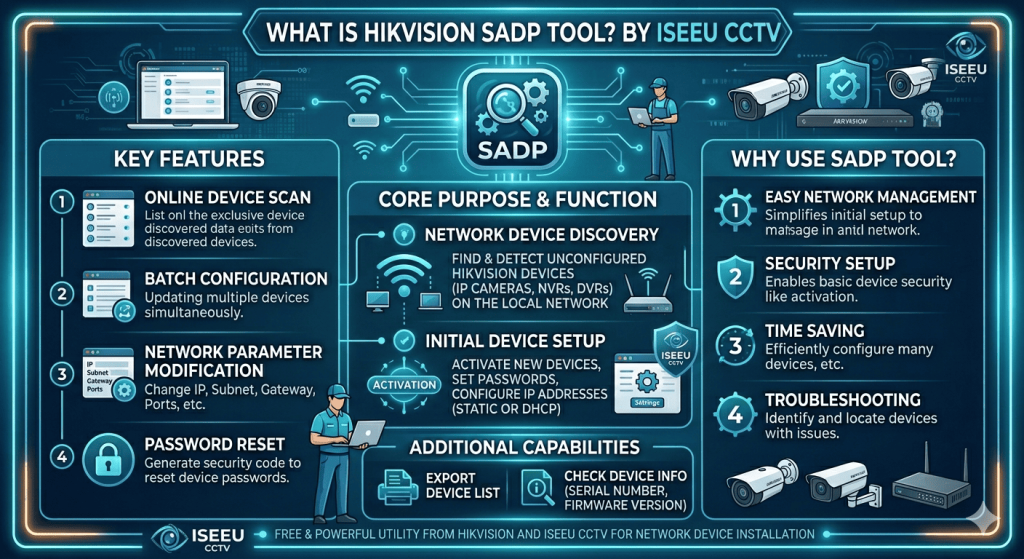
If you own a Hikvision CCTV system and are struggling to find your cameras, activate a device, reset an IP address, or regain access after a password issue, the Hikvision SADP Tool is often the key to solving the problem.
However, while the SADP Tool is powerful, it can also be confusing for non-technical users. Incorrect use can lock devices, cause network conflicts, or even make a system inaccessible.
That’s where our expert Hikvision support services come in. We use the SADP Tool daily to diagnose, repair, and restore Hikvision CCTV systems for homes and businesses across the UK.
What Is the Hikvision SADP Tool?
SADP (Search Active Devices Protocol) is a free utility developed by Hikvision that allows engineers to:
- *Detect Hikvision devices on a local network
- *Activate new cameras, NVRs, and DVRs
- *View and change IP addresses
- *Recover access to inactive or inaccessible devices
- *Diagnose network and communication issues
The tool scans your local network and displays all Hikvision equipment it can detect, even if the devices are on the wrong IP range.
Common Problems the Hikvision SADP Tool Can Diagnose
Many customers contact us after hours of frustration trying to get their system working. The most common issues we resolve using SADP include:
1. Hikvision Device Not Showing on the Network
If your camera or recorder is not appearing on your router or NVR, SADP can:
- *Detect hidden or mismatched IP addresses
- *Identify subnet conflicts
- *Reveal devices set to a different network range
2. Inactive Hikvision Camera or NVR
Brand-new Hikvision devices arrive inactive and must be activated before use. SADP allows:
- *Secure device activation
- *Creation of a strong admin password
- *Initial configuration before installation
3. Forgotten Hikvision Passwords
Password issues are one of the most common Hikvision problems. Using SADP (with proper verification), we can:
- *Diagnose whether a device is locked
- *Guide you through the correct reset process
- *Prevent permanent device lockouts
⚠️ Incorrect reset attempts can permanently disable a Hikvision device — professional handling is essential.
4. IP Address Conflicts & Network Errors
If cameras randomly drop offline or fail to record:
- *SADP helps identify duplicate IP addresses
- *Confirms correct gateway and subnet settings
- *Ensures proper communication with NVRs and routers
5. Hikvision Camera Not Adding to NVR
SADP lets us:
- *Verify camera status
- *Confirm protocol compatibility
- *Ensure credentials and IP details are correct
Why Most Users Struggle With the Hikvision SADP Tool
Although the tool is free, it’s designed primarily for trained installers and engineers, not end users. Common mistakes include:
- ✅Assigning incorrect IP ranges
- ✅Activating devices incorrectly
- ✅Locking devices due to repeated password attempts
- ✅Misunderstanding subnet and gateway settings
These errors often result in additional call-outs, downtime, or full system reconfiguration.
Our Expert Hikvision SADP Support Services
We don’t just explain the SADP Tool — we use it professionally to fix problems fast.
What We Offer:
- ✅ Full Hikvision network diagnostics
- ✅ SADP-based device activation & configuration
- ✅ Secure password recovery assistance
- ✅ IP restructuring for stable CCTV systems
- ✅ Remote & on-site troubleshooting
Whether you’re a homeowner, business owner, landlord, or site manager, we can quickly identify and resolve your Hikvision issues.
Remote & On-Site Hikvision Diagnostics
In many cases, we can diagnose SADP-related issues remotely, saving you time and money. For more complex installations, we also provide on-site support to ensure everything is configured correctly from the start.
Why Choose Us for Hikvision SADP Support?
- 🔧 Hands-on experience with Hikvision systems
- 🔐 Safe, compliant reset and activation methods
- 🌐 Strong networking knowledge (routers, VLANs, PoE switches)
- 📍 Local, reliable, and professional service
- 📞 Ongoing support after the fix
We work with Hikvision, HiLook, ColorVu, AcuSense, and legacy Hikvision equipment.
Need Help With the Hikvision SADP Tool?
If your Hikvision CCTV system is:
- *Offline
- *Inactive
- *Locked
- *Not recording
- *Not connecting to the network
Don’t guess — get expert help.
👉 Contact us today for professional Hikvision SADP diagnostics and support.
We’ll get your system back online quickly, securely, and correctly.